
Lab 5: Transformations#
In computer graphics, transformations allow us to control where objects appear, how they are oriented, and how large they are within a scene. Without transformations, every object would remain fixed at the origin, with no way to move, rotate, or scale it. Transformations are therefore fundamental to building interactive and visually rich graphics applications.
In this lab, we will see how transformations such as translation, rotation, and scaling are represented mathematically using vectors and matrices. We will see how combining these operations enables us to position objects on the screen.
Task
Copy your Lab 3 Textures folder you created in Lab 3: Textures (you will have needed to have completed this lab before continuing here), rename it to Lab 5 Transformations, change the name of textures.js to transformations.js and update index.html to embed this file.
Also, copy the file maths.js from your Lab 4 Vectors and Matrices folder into the Lab 5 Transformation folder and embed this into the index.html file.
Load index.html using a live server, and you should see the textured rectangle from Lab 3 - Textures.
The WebGL coordinate system#
In 3D graphics a coordinate system defines how points, directions and rotations are represented. The two main conventions are the right-handed and left-handed coordinates systems. Both use \(x\), \(y\) and \(z\) axes but they differ in which direction the \(z\)-axis points relative to the \(x\) and \(y\) axis.
The right-handed coordinate system is where on your right hand:
the thumb points along the positive \(x\)-axis,
the index finger points along the positive \(y\)-axis,
the middle finger points along the positive \(z\)-axis.
The other way of representing 3D space is to use a left-hand coordinate system which is the same but on your left hand.
WebGL uses the right-handed coordinate system where the \(x\)-axis points to the right of the screen, the \(y\)-axis points towards the top of the screen and the \(z\)-axis points out of the screen towards you (Fig. 27).
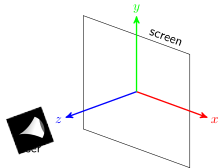
Fig. 27 The WebGL co-ordinate system.#
Other graphics libraries that use the right-handed coordinate system include OpenGL, Three.js, Vulkan, Metal (Apple) and applications such as Unreal Engine and Blender. Graphics libraries that use the left-handed coordinate system include DirectX, Direct3D and Unity.
Transformation matrices#
Each transformation has an associated transformation matrix which we use to multiply the vertex coordinates of a shape to calculate the vertex coordinates of the transformed shape. For example if \(A\) is a transformation matrix for a particular transformation and \((x,y,z)\) are the coordinates of a vertex then we apply the transformation using
where \((x',y',z')\) are the coordinates of the transformed point. Note that all vectors and coordinates are written as a column vector when multiplying by a matrix.
Translation#
The translation transformation when applied to a set of points moves each point by the same amount. For example, consider the triangle in Fig. 28, each of the vertices has been translated by the same vector \(\vec{t}\) which has that effect of moving the triangle.
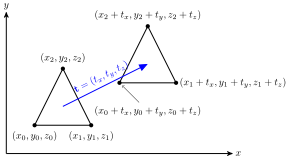
Fig. 28 Translation of a triangle by the translation vector \(\vec{t}= (t_x, t_y, t_z)\).#
A problem we have is that no transformation matrix exists for applying translation to the coordinates \((x, y, z)\), i.e., we can’t find a matrix \(Translate\) such that
We can use a trick where we use homogeneous coordinates. Homogeneous coordinates add another value, \(w\) say, to the \((x, y, z)\) coordinates (known as Cartesian coordinates) such that when the \(x\), \(y\) and \(z\) values are divided by \(w\) we get the Cartesian coordinates.
So if we choose \(w=1\) then we can write the Cartesian coordinates \((x, y, z)\) as the homogeneous coordinates \((x, y, z, 1)\) (remember that 4-element vector with the additional 1 in our vertex shader?). So how does that help us with our elusive translation matrix? Well we can now represent translation as a \(4 \times 4\) matrix
which is our desired translation. So the translation matrix for translating a set of points by the vector \(\vec{t} = (t_x, t_y, t_z)\) is
Important
Recall that WebGL and glm use column-major order, so when coding transformation matrices into JavaScript we need to code the transpose of the matrix. So the translation matrix we are going to use is
Let’s translate the rectangle \(0.4\) to the right and \(0.3\) upwards (remember we are dealing with normalised device coordinates, so the window coordinates are between \(-1\) and \(1\)). The transposed transformation matrix to perform this translation is
We are going to define matrix class to compute the various transformation matrices.
Task
Add the following method to the Mat4 class in the maths.js file
translate(t) {
  const [x, y, z] = t;
  const transMatrix = new Mat4().set([
      1, 0, 0, 0,
      0, 1, 0, 0,
      0, 0, 1, 0,
      x, y, z, 1
  ]);

  return this.multiply(transMatrix);
}
Here we have defined the method translate() that calculates the translation matrix for a given translation vector multiplies the current matrix object by the translation matrix.
The multiplication of the vertex coordinates by the transformation matrices is done in the GPU as opposed to the CPU. This is because GPUs are specifically designed to perform matrix multiplication on millions of vertices in parallel, so doing this in the GPU is much faster and frees up the CPU. So we send the transformation matrix to the vertex shader using a uniform, like we did in Lab 3: Textures.
Task
In the render() function in the transformations.js file, add the following code after cleared the frame buffers
// Calculate the model matrix
const model = new Mat4().translate([0.4, 0.3, 0])

// Send model matrix to the shader
gl.uniformMatrix4fv(gl.getUniformLocation(program, "uModel"), false, model.m);
Here we have created a matrix called model and have sent this to the shader using the uniform name uModel. The model matrix is a matrix that combines all of the transformations that will be applied to an object, so rather then sending multiple transformation matrices to the shaders, we just send the single model matrix. The model matrix is the combination of transformations that are applied to each vertex of the object.
We now have to modify the vertex shader to use our new transformation matrix.
Task
In the vertex shader definition at the top of the transformations.js file, add the following uniform declaration before the main() function.
uniform mat4 uModel;
And change the calculation of gl_Position to the following
gl_Position = uModel * vec4(aPosition, 1.0);
Refresh your web browser and you should see that our rectangle has been translated to the right and up a bit as shown in Fig. 29.
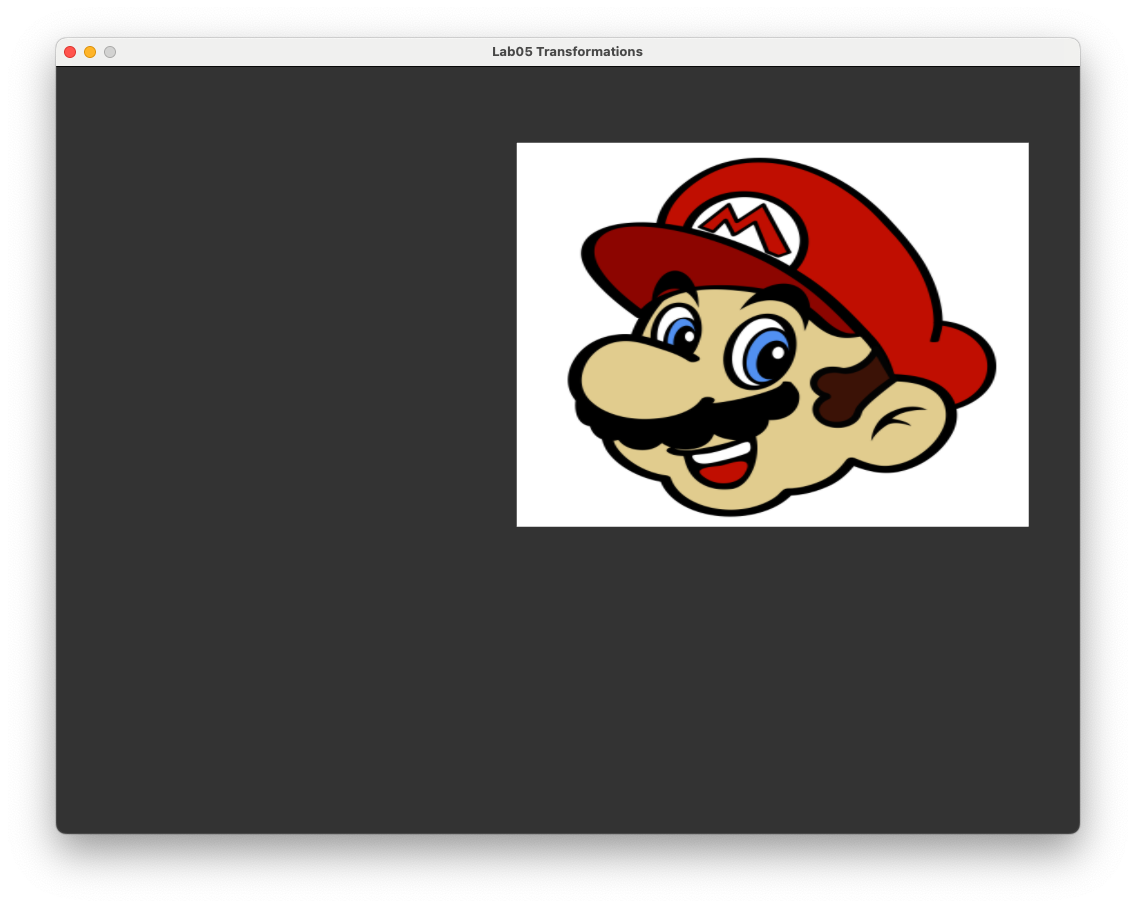
Fig. 29 The rectangle is translated by the vector \((0.4, 0.3, 0)\).#
Scaling#
Scaling is one of the simplest transformation we can apply. Multiplying the \(x\), \(y\) and \(z\) coordinates of a point by a scalar quantity (a number) has the effect of moving the point closer or further away from the origin (0,0). For example, consider the triangle in Fig. 30. The \(x\), \(y\) and \(z\) coordinates of each vertex has been multiplied by \(s_x\), \(s_y\) and \(s_y\) respectively which has the effect of scaling the triangle and moving the vertices further away from the origin (in this case because \(s_x\), \(s_y\) and \(s_z\) are all greater than 1).
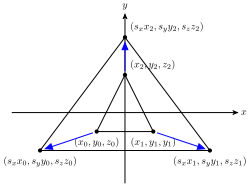
Fig. 30 Scaling a triangle centred at the origin.#
Since scaling is simply multiplying the coordinates by a number we have
so the scaling matrix for applying the scaling transformation is
Let’s now apply scaling to our rectangle in WebGL to increase its size by a factor of 0.5 in the horizontal direction and 0.4 in the vertical direction. The scaling matrix that achieves this is
We have already created a model matrix and the uniform in the vertex shader, so we just need to calculate the scaling matrix and use it instead of the translation matrix.
Task
Enter the following method to the Mat4 class
scale(s) {
  const [x, y, z] = s;
  const scaleMatrix = new Mat4().set([
      x, 0, 0, 0,
      0, y, 0, 0,
      0, 0, z, 0,
      0, 0, 0, 1
  ]);

  return this.multiply(scaleMatrix);
}
Edit the code that calculates the model matrix so that it looks like the following
const model = new Mat4().scale([0.5, 0.4, 1]);
Refresh your web browser and you should see that our rectangle has been scaled down as shown in Fig. 31.
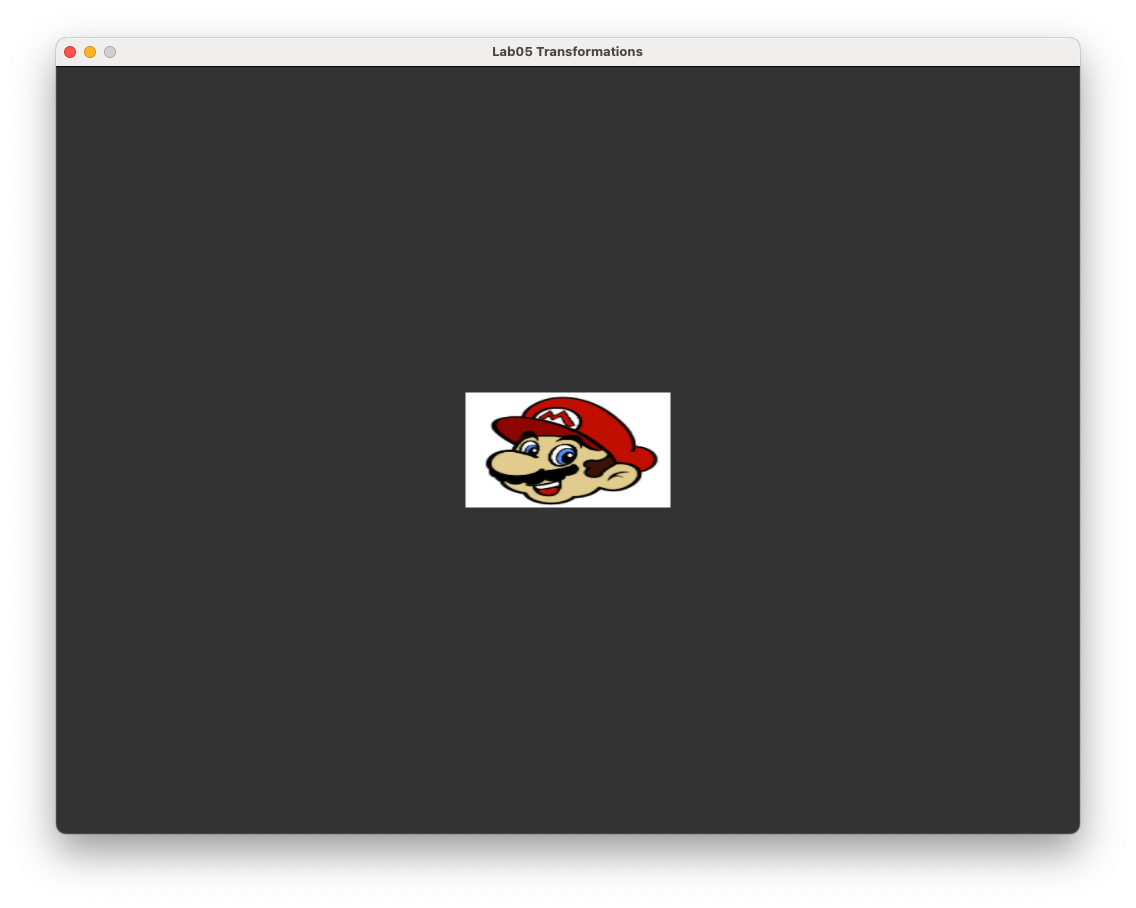
Fig. 31 The rectangle is scaled by the vector \((0.5, 0.4, 1)\).#
Note
If scaling is applied to a shape that is not centred at \((0,0,0)\) then the transformed shape is distorted and its centre is moved from its original position (Fig. 32).
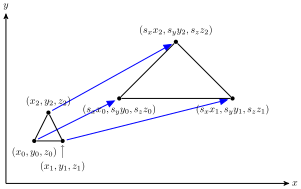
Fig. 32 Scaling applied to a triangle not centred at \((0,0,0)\).#
If the desired result is to resize the shape whilst keeping its dimensions and location the same we first need to translate the vertex coordinates by \(-\vec{c}\) where \(\vec{c}\) is the centre of volume for the shape so that it is at \((0,0,0)\). Then we can apply the scaling before translating by \(\vec{c}\) so that the centre of volume is back at the original position (Fig. 33).
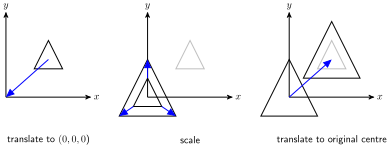
Fig. 33 The steps required to scale a shape about its centre.#
Rotation#
As well as translating and scaling objects, the next most common transformation is the rotation of objects around the three co-ordinate axes \(x\), \(y\) and \(z\). We define the rotation anti-clockwise around each of the co-ordinate axes by an angle \(\theta\) when looking down the axes (Fig. 34).
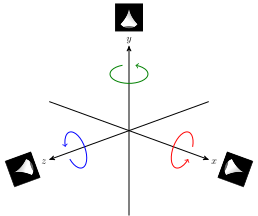
Fig. 34 Rotation is assumed to be in the anti-clockwise direction when looking down the axis.#
The rotation matrices for achieving these rotations are
You don’t really need to know how these are derived but if you are curious you can click on the dropdown link below.
Derivation of the rotation matrices (click to show)
We will consider rotation about the \(z\)-axis and will restrict our coordinates to 2D.
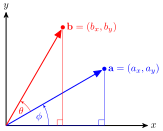
Fig. 35 Rotating the vector \(\vec{a}\) anti-clockwise by angle \(\theta\) to the vector \(\vec{b}\).#
Consider Fig. 35 where the vector \(\vec{a}\) is rotated by angle \(\theta\) to the vector \(\vec{b}\). If we form a right-angled triangle (the blue one) then we know the length of the hypotenuse, \(\|\vec{a}\|\), and the angle \(\theta\), so we can calculate the lengths of the adjacent and opposite sides using trigonometry. Remember our trig ratios (SOH-CAH-TOA)
so the length of the adjacent and opposite sides of the blue triangle is
Since \(a_x\) and \(a_y\) are the lengths of the adjacent and opposite sides respectively and \(\|\vec{a}\|\) is the length of the hypotenuse we have
Using the same method for the vector \(\vec{b}\) we have
We can rewrite \(\cos(\phi+\theta)\) and \(\sin(\phi+\theta)\) using trigonometric identities
so equation (12) is
Substituting equation (11) into equation (13) gives
which can be written using matrices as
so the transformation (non-transposed) matrix for rotating around the \(z\)-axis in 2D is
We need a \(4\times 4\) matrix to represent 3D rotation around the \(z\)-axis, so we replace the 3rd and 4th row and columns with the 3rd and 4th row and column from the \(4\times 4\) identity matrix giving
The rotation matrices for the rotation around the \(x\) and \(y\) axes are derived using a similar process.
Let’s rotate our original rectangle anti-clockwise about the \(z\)-axis by \(\theta = 45^\circ\). The transposed rotation matrix to do this is
Note
Angles in JavaScript are always expressed in radians, so we need to use the following to convert from degrees to radians
Task
Add the following method to the Mat4 class
rotate(angle) {
  const c = Math.cos(angle);
  const s = Math.sin(angle);
  const rotateMatrix = new Mat4().set([
       c, s, 0, 0,
      -s, c, 0, 0,
      0,  0, 1, 0,
      0,  0, 0, 1
  ]);

  return this.multiply(rotateMatrix);
}
Edit the code that calculates the model matrix so that it looks like the following
const model = new Mat4().rotate(45 * Math.PI / 180);
Here we defined a Mat4 class method that calculates the rotation matrix and multiplies the current matrix object by the rotation matrix. Refresh your web browser, and you should see that our rectangle has been rotated \(45^\circ\) degrees in the anti-clockwise direction as shown in Fig. 36.
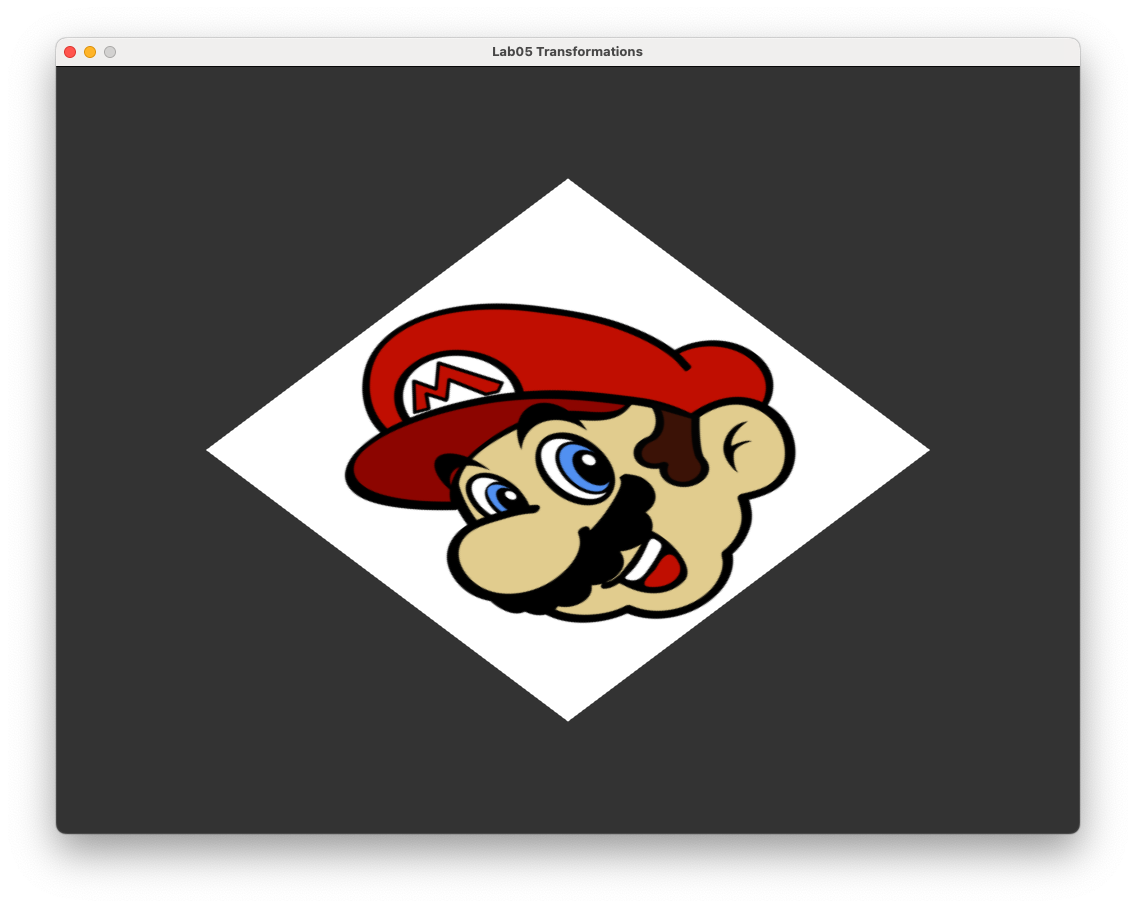
Fig. 36 Rectangle rotated anti-clockwise about the \(z\)-axis by \(45^\circ\).#
Axis-angle rotation#
The three rotation transformations are only useful if we want to only rotate around one of the three coordinate axes. A more useful transformation is the rotation around the axis that points in the direction of a unit vector \(\hat{\vec{v}}\) which has its tail at \((0,0,0)\) (Fig. 37).
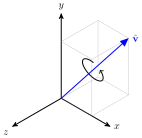
Fig. 37 Axis-angle rotation.#
The transposed transformation matrix for rotation around a unit vector \(\hat{\vec{v}} = (v_x, v_y, v_z)\), anti-clockwise by angle \(\theta\) when looking down the vector is.
Where \(c = \cos(\theta)\) and \(s = \sin(\theta)\). Again, you don’t really need to know how this is derived but if you are curious click on the dropdown link below.
Derivation of the axis-angle rotation matrix (click to show)
The rotation about the unit vector \(\hat{\vec{v}} = (v_x, v_y, v_z)\) by angle \(\theta\) is the composition of 5 separate rotations:
Rotate \(\hat{\vec{v}}\) around the \(x\)-axis so that it is in the \(xz\)-plane (the \(y\) component of the vector is 0);
Rotate the vector around the \(y\)-axis so that it points along the \(z\)-axis (the \(x\) and \(y\) components are 0 and the \(z\) component is a positive number);
Perform the rotation around the \(z\)-axis;
Reverse the rotation around the \(y\)-axis;
Reverse the rotation around the \(x\)-axis.
The rotation around the \(x\)-axis is achieved by forming a right-angled triangle in the \(yz\)-plane where the angle of rotation \(\theta\) has an adjacent side of length \(v_z\), an opposite side of length \(v_y\) and a hypotenuse of length \(\sqrt{v_y^2 + v_z^2}\) (Fig. 38).
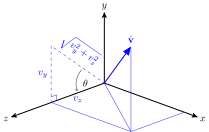
Fig. 38 Rotate \(\vec{v}\) around the \(x\)-axis#
Therefore, \(\cos(\theta) = \dfrac{v_z}{\sqrt{v_y^2 + v_z^2}}\) and \(\sin(\theta) = \dfrac{v_y}{\sqrt{v_y^2 + v_z^2}}\) so the rotation matrix is
The rotation around the \(y\)-axis is achieved by forming another right-angled triangle in the \(xz\)-plane where \(\theta\) has an adjacent side of length \(\sqrt{v_y^2 + v_z^2}\), an opposite side of length \(v_x\) and a hypotenuse of length 1 since \(\hat{\vec{v}}\) is a unit vector (Fig. 39).
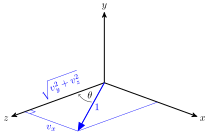
Fig. 39 Rotate around the \(y\)-axis#
Therefore, \(\cos(\theta) = \sqrt{v_y^2 + v_z^2}\) and \(\sin(\theta) = v_x\). Note that here we are rotating in the clockwise direction so the rotation matrix is
Now that the vector points along the \(z\)-axis we perform the rotation so the rotation matrix for this is
The reverse rotation around the \(y\) is simply the rotation matrix \(R_2\) with the negative sign for \(\sin(\theta)\) swapped
The reverse rotation around the \(x\) is simply the rotation matrix \(R_1\) with the negative sign for \(\sin(\theta)\) swapped
Multiplying all the separate matrices together gives
Where \(c = \cos(\theta)\) and \(s = \sin(\theta)\). Substituting \(v_y^2 + v_z^2 = 1 - v_x^2\) and the matrix simplifies to
This matrix is transposed when working with column-major ordering to give our final axis-angle rotation matrix.
The rotations around the three coordinates axis can be calculated using the axis-angle rotation matrix (by letting \(\hat{\vec{v}}\) be \((1,0,0)\), \((0,1,0)\) or \((0,0,1)\) for rotating around the \(x\), \(y\) and \(z\) axes respectively) so we can edit our rotate() function so that it uses equation (14).
Task
Edit the rotate() method so that it looks like the following
rotate(axis, angle) {
  axis = normalize(axis);
  const [x, y, z] = axis;
  const c = Math.cos(angle);
  const s = Math.sin(angle);
  const t = 1 - c;
  const rotateMatrix = new Mat4().set([
    t * x * x + c,      t * x * y + s * z,  t * x * z - s * y,  0,
    t * y * x - s * z,  t * y * y + c,      t * y * z + s * x,  0,
    t * z * x + s * y,  t * z * y - s * x,  t * z * z + c,      0,
    0, 0, 0, 1
  ]);

  return this.multiply(rotateMatrix);
}
Edit the code that calculates the model matrix so that it looks like the following
const model = rotate([0, 0, 1], 45 * Math.PI / 180);
Here we have changed the rotate() method so that we can now use axis-angle rotation, and have used it to rotate the rectangle by \(45^\circ\) anti-clockwise about a vector pointing along the \(z\)-axis (i.e., straight out of the screen towards you). Refreshing your browser, and you should see that the output doesn’t change (Fig. 36).
Composite transformations#
So far we have performed translation, scaling and rotation transformations on our rectangle separately. What if we wanted to combine these transformations so that we can control the size, rotation and position of the rectangle? If we apply the transformations in the order scale, rotate, translate then applying the scaling we have
Next applying rotation to the scaled coordinates we have
Finally, applying translation to the scaled and rotated coordinates we have
\(Translate \cdot Rotate \cdot Scale\) is a single \(4 \times 4\) transformation matrix that combines the three transformations known as the model matrix. Note the order that the translations are applied to the coordinates is read from right to left.
Let’s apply scaling, rotation and translation (in that order) to our rectangle. Since we have already calculated the separate transformation matrices all we need to do is to multiply them together when calculating the model matrix.
Task
Edit the code that calculates the model matrix so that it looks like the following
// Calculate the model matrix
const model = new Mat4()
  .translate([0.4, 0.3, 0])
  .rotate([0, 0, 1], 45 * Math.PI / 180)
  .scale([0.5, 0.4, 1]);
Refresh your web browser, and you should see that the rectangle has been scaled down, rotated anti-clockwise and then translated as shown in Fig. 40.
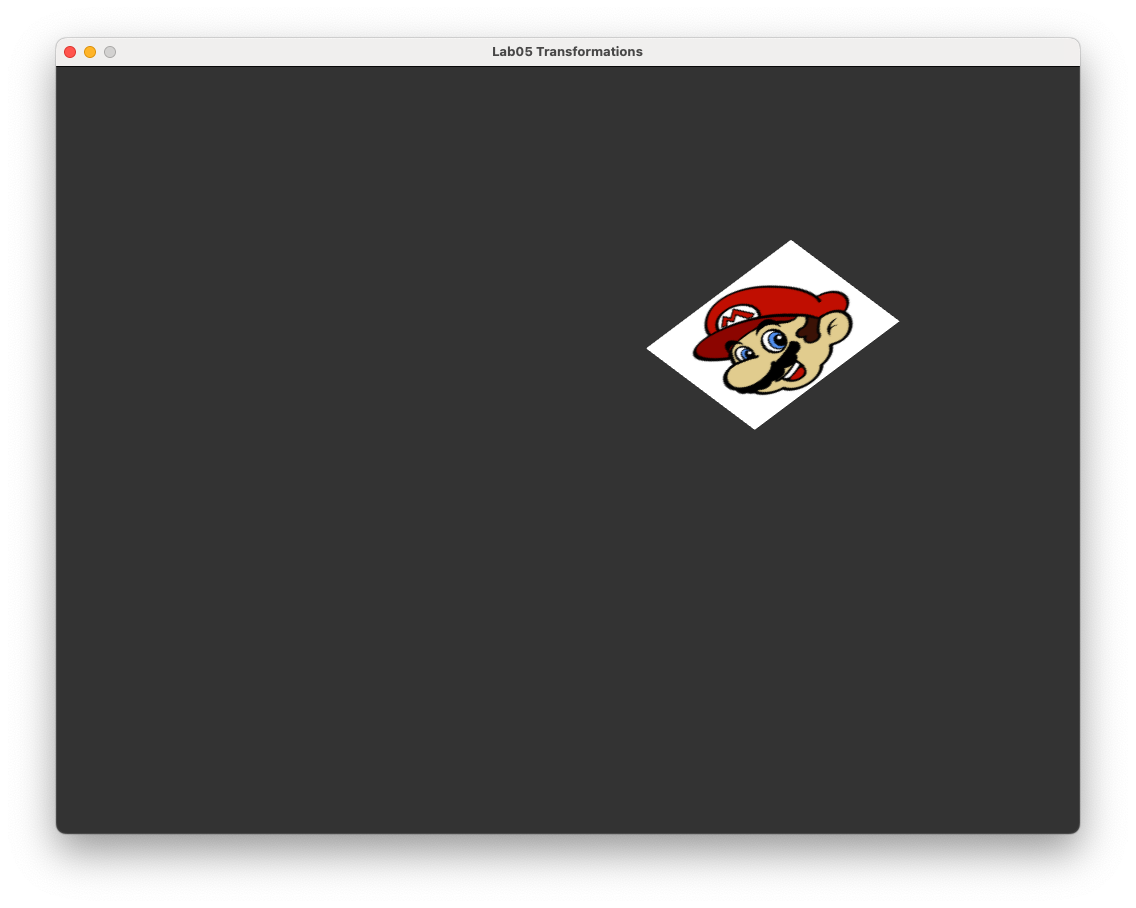
Fig. 40 Scaling, rotation and translation applied to the textured rectangle.#
Animation#
We are now going to introduce animation to our WebGL application so that we can better see the effects of animations. Animation is done by redrawing the scene while updating values that represent motion or change, such as the position and size of an object. In WebGL this is done using the browser’s built-in requestAnimationFrame() function which schedules the rendering function to run before the next screen refresh (typically 60 times per second).
Our render() function is used to update the animation state and draw the frame. The callback recieves a timestamp that is the time in milliseconds since the rendering of the last frame which is useful for controlling movement speed. So what is happening is that whilst the rectangle may look like a static image, it is continously being redrawn every 60th of a second.
Let rotate our rectangle about its centre.
Task
Change the render() function declaration so that it takes in an input of the time since the application was started.
function render(time) {
Then change the code used to calculate the model matrix to the following
// Calculate the model matrix
const rotationsPerSecond = 1/2;
const angle = rotationsPerSecond * time * 0.001 * 2 * Math.PI;
const model = new Mat4()
  .translate([0.4, 0.3, 0])
  .rotate([0, 0, 1], angle)
  .scale([0.5, 0.4, 1]);
Here we calculate the rotation angle so that the rectangle will complete one full rotation every 2 seconds. Note that time is the time in milliseconds since the application was started hence we multiply the number of radians in a circle, \(2\pi\), by 0.001.
Refresh your browser, and you should see something similar to below.
When calculating the composite transformation matrix the order in which we multiply the individual transformations will determine the effects of the composite transformation. To see this lets translate the rectangle first before rotating it.
Task
Change the calculation of the model matrix so that it looks like the following.
const model = new Mat4()
   .rotate([0, 0, 1], angle)
   .translate([0.4, 0.3, 0])
   .scale([0.5, 0.4, 1]);
Here we have changed the order which the transformation matrices for translation and rotation are switched, i.e.,
which has the effect of moving the rectangle so that it is centred at coordinates \((0.4, 0.3, 0)\) and then rotated about \((0, 0, 0)\). Refresh your browser and you should see something similar to below.
Exercises#
Scale the original rectangle so that it is a quarter of the original size and apply translation so that the rectangle moves anti-clockwise around a circle centred at the window centre with radius 0.5 and completes one full rotation every 5 seconds. Hint: the coordinates of points on a circle centered at \((0,0)\) with radius \(r\) can be calculated using \(x = r\cos(t)\) and \(y = r\sin(t)\) where \(t\) is some number.
Rotate your rectangle from exercise 1 in a clockwise rotation about its centre at twice the rotation speed used in exercise 1.
Scale your rectangle from exercise 2 so that it grows and shrinks about its centre. Hint: The \(\sin(t)\) function oscillates between 0 and 1 as \(t\) increases.
Transform the rectangle so that it moves around the canvas and bounces off the edges of the canvas.