
Lab 4: Vectors and Matrices#
Computer graphics relies heavily on mathematics of vectors and matrices. In this lab we will be revising the important concepts needed for computer graphics and using a library to perform calculations.
In this lab we will not be drawing any graphical objects, but we will be writing JavaScript code to perform calculations. So the first thing we are going to do is set up a simple HTML page and write a JavaScript function to print console output to the page.
Task
Create a folder called Lab 4 Vectors and Matrices inside which create a file called index.html and enter the following into it.
<!doctype html>

<html lang="en">
    <head>
        <title>Lab 4 - Vectors and Matrices</title>
    </head>
    <body>
        <div id="console-output"
                 style="font-family:monospace; white-space: pre; padding:10px;">
        </div>
        <script src="maths.js"></script>
        <script src="vectors_and_matrices.js"></script>
    </body>
</html>
Create another file called vectors_and_matrices.js and enter the following into it.
function setupConsoleOutput(elementId) {
  const output = document.getElementById(elementId);

  function write(args) {
    const line = document.createElement("div");
    line.textContent = [...args].join(" ");
    output.appendChild(line);
  }
  console.log = (...args) => write(args);
}

setupConsoleOutput("console-output");
console.log("Lab 4 - Vectors and Matrices\n----------------------------");
Here we have the function setupConsoleOutput() in the vectors_and_matrices.js file which means that any call to console.log() will output to the HTML page.
Lab 5 - Vectors and Matrices
----------------------------
Vectors#
A vector in is an object with magnitude (length) and direction. A vector is denoted by a lower case letter in boldface, e.g., \(\vec{a}\) (or underlined when writing by hand), and represented mathematically by a tuple which is an ordered set of numbers. In geometry, each number in the vector represents the length along the co-ordinate axes. For example, consider the 3-element vector
Here \(\vec{a}\) has 3 elements so is a vector in 3D space where \(a_x\), \(a_y\) and \(a_z\) are the lengths of the vector in the \(x\), \(y\), and \(z\) directions.
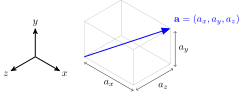
Fig. 21 A 3D vector.#
Note
The reason the diagram above has the \(y\)-axis pointing upwards and the \(z\)-axis pointing along the horizontal is because this is the way WebGL represents 3D space (see Lab 5: Transformations for more details). The configuration of the axes does not matter for the calculations we will be performing in this lab, but I wanted to be consistent.
Since we will be using vectors (and matrices) a lot over the rest of the labs we will create a file containing helper functions to perform operations.
Task
Create file called maths.js and enter the following function definition.
// Vector operations
function printVector(v) {
    return `[ ${v[0].toFixed(2)}, ${v[1].toFixed(2)}, ${v[2].toFixed(2)} ]`;
}
Here we have defined a function that prints a 3-element vector. Now let’s create the following vectors in JavaScript and print them.
Task
Add the following code to the vectors_and_matrices.js file.
// Vectors
console.log('\nVectors\n-------');

const a = [3, 0, 4];
const b = [1, 2, 3];
console.log("a = " + printVector(a));
console.log("b = " + printVector(b));
Here we have created the two vectors a and b and printed these to our webpage which should now look like
Vectors
-------
a = [ 3.00, 0.00, 4.00 ]
b = [ 1.00, 2.00, 3.00 ]
Vector addition and subtraction#
Like numbers, we can define the arithmetic operations of addition, subtraction for vectors as well as multiplication and division by a scalar. The addition and subtraction of two vectors \(\vec{a} = (a_x, a_y, a_z)\) and \(\vec{b} = (b_x, b_y, b_z)\) is defined by
For example, given the vectors \(\vec{a} = (3,0,4)\) and \(\vec{b} = (1, 2, 3)\)
What is happening in a geometrical sense when we add and subtract vectors? Take a look at Fig. 22, here the vector \(\vec{b}\) has been added to the vector \(\vec{a}\) where the tail of \(\vec{b}\) is placed at the head of \(\vec{a}\). The resulting vector \(\vec{a} + \vec{b}\) points from the tail of \(\vec{a}\) to the head of \(\vec{b}\).

Fig. 22 Vector addition.#
The subtraction of the vector \(\vec{b}\) does similar, but since \(\vec{a} - \vec{b} = \vec{a} + (-1)\vec{b}\) then the direction of \(\vec{b}\) is reversed so \(\vec{a} - \vec{b}\) is the same as placing the tail of \(-\vec{b}\) at the head of \(\vec{a}\).
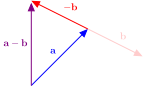
Fig. 23 Vector subtraction.#
To calculate the addition and subtraction of vectors we are going to write functions to do this.
Task
Add the following functions to the maths.js file
function addVector(a, b) {
  return [ a[0] + b[0], a[1] + b[1], a[2] + b[2] ];
}

function subtractVector(a, b) {
  return [ a[0] - b[0], a[1] - b[1], a[2] - b[2] ];
}
Here we have defined two similar functions addVector() and subtractVector() that add and subtract two vectors.
Task
Add the following to the vectors_and_matrices.js file
// Arithmetic operations on vectors
console.log('\nArithmetic operations on vectors\n--------------------------------');
console.log("a + b =", printVector(addVector(a, b)));
console.log("a - b =", printVector(subtractVector(a, b)));
Refresh your web page, and you should see the following has been added
Arithmetic operations on vectors
--------------------------------
a + b = [ 4.00, 2.00, 7.00 ]
a - b = [ 2.00, -2.00, 1.00 ]
Multiplication by a scalar#
Multiplication of a vector \(\vec{a} = (a_x, a_y, a_z)\) by a scalar (a number) \(k\) are defined by
For example, multiplying the vector \(\vec{a} = (3, 0, 4)\) by the scalar 2 gives
If we wanted to divide by a scale \(k\) then we simply multiply by \(\dfrac{1}{k}\). For example, dividing the vector \(\vec{b} = (1, 2, 3)\) by 3 gives
Multiplying a vector by a positive scalar has the effect of scaling the length of the vector. Multiplying by a negative scalar reverses the direction of the vector.

Task
Add the following function to the maths.js file
function scaleVector(v, k) {
  return [ k * v[0], k * v[1], k * v[2] ];
}
Now add the following to the vectors_and_matrices.js file
console.log("2a =", printVector(scaleVector(a, 2)));
console.log("b/3 =", printVector(scaleVector(b, 1/3)));
Refresh your web page, and you should see the following has been added
2a = [ 6.00, 0.00, 8.00 ]
b/3 = [ 0.33, 0.67, 1.00 ]
Vector magnitude#
The length or magnitude of a vector \(\vec{a} = (a_x, a_y, a_z)\) is denoted by \(\|\vec{a}\|\) is the length from the tail of the vector to the head.

Fig. 24 Vector magnitude (length).#
The magnitude is calculated using an extension of Pythagoras’ theorem, for example for 3D vectors the magnitude is
For example, if \(\vec{a} = (3, 0, 4)\) and \(\vec{b} = (1, 2, 3)\) then their magnitudes are
Task
Add the following function to the maths.js file
function length(v) {
  return Math.sqrt(v[0] * v[0] + v[1] * v[1] + v[2] * v[2]);
}
Now add enter the following code to the vectors_and_matrices.js file
// Vector magnitude and normalization
console.log("\nVector magnitude and normalization\n----------------------------------");
console.log("length(a) = " + length(a));
console.log("length(b) = " + length(b));
Refresh your web page, and you should see the following has been added
Vector magnitude and normalization
----------------------------------
length(a) = 5
length(b) = 3.7416573867739413
Unit vectors#
A unit vector is a vector that has a length of 1. We can find a unit vector that points in the same direction as a non-zero vector \(\vec{a}\), which is denoted by \(\hat{\vec{a}}\) (pronounced a-hat), by dividing by its magnitude, i.e.,
This process is called normalising a vector. For example, to determine a unit vector pointing in the same direction as the vector \(\vec{a} = (3, 0, 4)\), we normalise it by dividing by its magnitude which is 5.
Checking that \(\hat{\vec{a}}\) has a magnitude of 1
Normalizing a vector is an operation that is used a lot in graphics programming, so it would be useful to have a function that does this.
Task
Add the following function to the maths.js file
function normalize(v) {
  const len = length(v);
  if (len === 0) return [0, 0, 0];
  return scaleVector(v, 1 / len);
}
Now add enter the following code to the vectors_and_matrices.js file
const aHat = normalize(a);
const bHat = normalize(b);
console.log("aHat = " + printVector(aHat));
console.log("bHat = " + printVector(bHat));
console.log("length(aHat) = " + length(aHat));
console.log("length(bHat) = " + length(bHat));
Refresh your web page, and you should see the following has been added
aHat = [ 0.60, 0.00, 0.80 ]
bHat = [ 0.27, 0.53, 0.80 ]
length(aHat) = 1
length(bHat) = 1
Both aHat and bHat have magnitudes of 1 which shows they are both unit vectors.
The dot product#
The dot product between two vectors \(\vec{a} = (a_x, a_y, a_z)\) and \(\vec{b} = (b_x, b_y, b_z)\) is denoted by \(\vec{a} \cdot \vec{b}\) and returns a scalar. The dot product is calculated using
The dot product is related to the angle \(\theta\) between the two vectors (Fig. 25) by
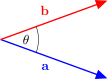
Fig. 25 The angle \(\theta\) between the vectors \(\vec{a}\) and \(\vec{b}\).#
A useful result for computer graphics is that if \(\theta=90^\circ\) then \(\cos(\theta) = 0\) and equation (5) becomes
In order words, if the dot product of two vectors is zero then the two vectors are perpendicular. For example, given the vectors \(\vec{a} = (3, 0, 4)\) and \(\vec{b} = (1, 2, 3)\) the dot product between these are
Task
Add the following function to the maths.js file
function dot(a, b) {
    return a[0] * b[0] + a[1] * b[1] + a[2] * b[2];
}
Now add enter the following code to the vectors_and_matrices.js file
// Dot and cross products
console.log("\nDot and cross products\n----------------------");
console.log("a . b = " + dot(a, b));
Refresh your web page, and you should see the following has been added
Dot and cross products
----------------------
a . b = 15
The cross product#
The cross product between two 3-element vectors \(\vec{a} = (a_x, a_y, a_z)\) and \(\vec{b} = (b_x, b_y, b_z)\) is denoted by \(\vec{a} \times \vec{b}\) and returns a vector. The cross product is calculated using
The cross product between two vectors produces another vector that is perpendicular to both of the vectors (Fig. 26). This is another incredibly useful result as it allows us to calculate a normal vector to a polygon which are used in calculating how light is reflected off surfaces (see Lab 8: Lighting).
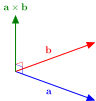
Fig. 26 The cross product between two vectors gives a vector that is perpendicular to both vectors.#
For example, given the vectors \(\vec{a} = (3,0,4)\) and \(\vec{b} = (1, 2, 3)\) the cross product \(\vec{a} \times \vec{b}\) is
We can show that \(\vec{a} \times \vec{b}\) is perpendicular to both \(\vec{a}\) and \(\vec{b}\) using the dot product
Task
Add the following function to the maths.js file
function cross(a, b) {
  return [
    a[1] * b[2] - a[2] * b[1],
    a[2] * b[0] - a[0] * b[2],
    a[0] * b[1] - a[1] * b[0]
  ];
}
Now add enter the following code to the vectors_and_matrices.js file
const aCrossB = cross(a, b);
console.log("a x b = " + printVector(aCrossB));
console.log("a . (a x b) = " + dot(a, aCrossB));
console.log("b . (a x b) = " + dot(b, aCrossB));
Refresh your web page, and you should see the following has been added
a x b = [ -8.00, -5.00, 6.00 ]
a . (a x b) = 0
b . (a x b) = 0
Here we have also shown that the cross product of a and b is perpendicular to both vectors.
Matrices#
Another type of mathematical object that is fundamental to computer graphics is the matrix. A matrix is a rectangular array of numbers.
It is common to use uppercase characters for the name of a matrix and lowercase characters for the individual elements. The elements of a matrix are referenced by an index which is a pair of numbers, the first of which is the horizontal row number and the second is the vertical column number so \(a_{ij}\) is the element in row \(i\) and column \(j\) of the matrix \(A\).
We refer to the size of a matrix by the number of rows by the number of columns. Here the matrix \(A\) has \(m\) rows and \(n\) columns, so we call this matrix a \(m \times n\) matrix. Computer graphics mostly works with \(4 \times 4\) matrices (see Lab 5: Transformations for why this is) so we will create a matrix class to define \(4 \times 4\) matrices and perform operations on them.
Task
Add the following class declaration to the maths.js file.
// 4x4 Matrix class
class Mat4 {
  constructor() {
    this.m = new Float32Array(16);
    this.identity();
  }

  identity() {
    const m = this.m;
    m[0] = 1; m[4] = 0; m[8]  = 0; m[12] = 0;
    m[1] = 0; m[5] = 1; m[9]  = 0; m[13] = 0;
    m[2] = 0; m[6] = 0; m[10] = 1; m[14] = 0;
    m[3] = 0; m[7] = 0; m[11] = 0; m[15] = 1;
    return this;
  }

  set(values) {
    this.m.set(values);
    return this;
  }

  toString() {
    const m = this.m;
    let string = "";
    for (let i = 0; i < 4; i++) {
      const row = [
        m[i * 4 + 0].toFixed(2).padStart(8),
        m[i * 4 + 1].toFixed(2).padStart(8),
        m[i * 4 + 2].toFixed(2).padStart(8),
        m[i * 4 + 3].toFixed(2).padStart(8),
      ];
      string += "    [" + row.join(" ") + " ]\n";
    }
    return string;
  }

  copy (mat) {
    this.m.set(mat.m);
    return this;
  }
}
Now add enter the following code to the vectors_and_matrices.js file.
// Matrices
console.log("\nMatrices\n--------");
const A = new Mat4().set([
   1,  2,  3,  4,
   5,  6,  7,  8,
   9, 10, 11, 12,
  13, 14, 15, 16
]);
console.log("A =\n" + A);
Here we have declared a class called Mat4 inside which we have defined the following methods
constructor()– the constructor method that defines a \(4\times 4\) identity matrix (we discuss identity matrices below)identity()– returns an identity matrixset()– sets the values of the matrix equal to 16 inputted valuestoString()– outputs a string that can be used withconsole.log()to print the matrixcopy()– makes a copy of the matrix (useful to avoid overwriting the matrix)
We have then created a matrix object and set the values equal to the matrix below and printed the matrix.
Refresh your web page, and you should see the following has been added
Matrices
--------
A =
  [    1.00     2.00     3.00     4.00 ]
  [    5.00     6.00     7.00     8.00 ]
  [    9.00    10.00    11.00    12.00 ]
  [   13.00    14.00    15.00    16.00 ]
Matrix transpose#
The transpose of a matrix \(A\) is denoted by \(A^\mathsf{T}\) and is defined
i.e., the rows and columns of \(A\) are swapped so row \(i\) of \(A\) is column \(i\) of \(A^\mathsf{T}\). For example, the matrix \(A\) we defined above
then \(A^\mathsf{T}\) is
Task
Add the following method definition to the matrix class.
transpose() {
  const m = this.m;
  let tmp;
  tmp = m[1];  m[1]  = m[4];  m[4]  = tmp;
  tmp = m[2];  m[2]  = m[8];  m[8]  = tmp;
  tmp = m[3];  m[3]  = m[12]; m[12] = tmp;
  tmp = m[6];  m[6]  = m[9];  m[9]  = tmp;
  tmp = m[7];  m[7]  = m[13]; m[13] = tmp;
  tmp = m[11]; m[11] = m[14]; m[14] = tmp;
  return this
}
Now add enter the following code to the vectors_and_matrices.js file.
console.log("\nA^T =\n" + A.transpose());
Refresh your web page, and you should see the following has been added
A^T =
  [    1.00     5.00     9.00    13.00 ]
  [    2.00     6.00    10.00    14.00 ]
  [    3.00     7.00    11.00    15.00 ]
  [    4.00     8.00    12.00    16.00 ]
So here we have transposed the matrix \(A\) and printed it. Note that the call A.transpose() has changed the elements in the matrix A so if we want to work with the original matrix we must first make a copy.
Task
Edit the code used to print the transpose of the matrix A to the following
const AT = new Mat4().copy(A);
console.log("\nA^T =\n" + AT.transpose());
console.log("\nA =\n" + A);
Here we have created a new matrix AT and copied the elements of A into it and printed the transpose of the new matrix. We have also printed the original A matrix to check that its elements are still the original values. Refresh your web browser and you should set the following.
A^T =
  [    1.00     5.00     9.00    13.00 ]
  [    2.00     6.00    10.00    14.00 ]
  [    3.00     7.00    11.00    15.00 ]
  [    4.00     8.00    12.00    16.00 ]

A =
  [    1.00     2.00     3.00     4.00 ]
  [    5.00     6.00     7.00     8.00 ]
  [    9.00    10.00    11.00    12.00 ]
  [   13.00    14.00    15.00    16.00 ]
Matrix multiplication#
Scalar multiplication of a matrix by a scalar is the same for matrices as it is for vectors. However, the multiplication of two matrices \(A\) and \(B\) is defined in a very specific way. If \(A\) and \(B\) are two matrices then the element in row \(i\) and column \(j\) of the matrix \(AB\) is calculated using
Where \(\vec{a}_i\) is the vector formed from row \(i\) of \(A\) and \(\vec{b}_j\) is the vector formed from column \(j\) of \(B\). In computer graphics we mainly work with \(4 \times 4\) matrices, so consider the following matrix multiplication
For the element in row 2 and column 3, \([AB]_{23}\), we have the dot product between row 2 of the left-hand matrix and column 3 of the right-hand matrix
so
Doing similar for the other elements gives
Task
Add the following method definition to the matrix class.
multiply(mat) {
  const result = new Float32Array(16);
  for (let col = 0; col < 4; col++) {
    for (let row = 0; row < 4; row++) {
      let sum = 0;
      for (let k = 0; k < 4; k++) {
          sum += this.m[row + k * 4] * mat.m[k + col * 4];
      }
      result[row + col * 4] = sum;
    }
  }
  this.set(result);
  return this;
}
Now add enter the following code to the vectors_and_matrices.js file.
const B = new Mat4().set([
    17, 18, 19, 20,
    21, 22, 23, 24,
    25, 26, 27, 28,
    29, 30, 31, 32
]);

const AB = new Mat4().copy(A).multiply(B);
console.log("\nB =\n" + B);
console.log("\nAB =\n" + AB);
Refresh your web page, and you should see the following has been added
B =
  [   17.00    18.00    19.00    20.00 ]
  [   21.00    22.00    23.00    24.00 ]
  [   25.00    26.00    27.00    28.00 ]
  [   29.00    30.00    31.00    32.00 ]

AB =
  [  538.00   612.00   686.00   760.00 ]
  [  650.00   740.00   830.00   920.00 ]
  [  762.00   868.00   974.00  1080.00 ]
  [  874.00   996.00  1118.00  1240.00 ]
Hang on a minute, this matrix isn’t the same as the one from equation (8). Our multiply() method hasn’t given us the result shown above. The reason for this is how the elements of a matrix are stored in memory.
Column-major order#
Linear memory is a contiguous block of addresses that can be sequentially accessed. So a 1D array is stored in adjacent memory locations. Since matrices are 2D we have a choice whether to store the elements in the rows or columns in adjacent locations. These are known as column-major order and row-major order. Consider the \(4 \times 4\) matrix
Using column-major order this will be stored in the memory as

i.e., we move down and across the matrix. Alternatively, using row-major order the matrix will be stored as

i.e., we move across and down the matrix. WebGL uses column-major order because it is based upon OpenGL which was written for early GPUs that treated vertex data as column vectors. So a matrix containing vertices is stored column-by-column which means, when working with WebGL, we need to switch the rows and columns around when multiplying matrices. This is why our multiply() method produced the wrong result.
To output the matrix multiplication \(AB\) as we would expect it to appear, we can swap A and B.
Task
Edit the line that computes the matrix AB so that A and B are swapped.
const AB = new Mat4().copy(B).multiply(A);
Refresh your browser and you should now see that we have the matrix seen in equation (8).
AB =
  [  250.00   260.00   270.00   280.00 ]
  [  618.00   644.00   670.00   696.00 ]
  [  986.00  1028.00  1070.00  1112.00 ]
  [ 1354.00  1412.00  1470.00  1528.00 ]
Important
When working with column-major ordering, matrix multiplication is read from right-to-left, so to calculate the multiplication \(AB\) we would reverse the order, i.e., \(BA\).
Note
Microsoft’s graphics library directX and Unreal Engine uses row-major order whilst WebGL, OpenGL, Vulkan (successor to OpenGL), Metal (Apple’s graphics library) and Unity all use column-major order. This means when porting code between the graphics libraries developers have to change all of their matrix calculations.
The Identity Matrix#
The identity matrix is a special square matrix where all the elements are zero apart from the elements on the diagonal line from the top-left element down to the bottom-right element (known as the main diagonal). For example the \(4 \times 4\) identity matrix is
The identity matrix is similar to the number 1 in that if we multiply any matrix by an identity matrix the result is unchanged. For example,
Matrix Inverse#
Whilst matrix multiplication is defined for certain matrices there is no way of dividing one matrix by another. However, for certain square matrices we can calculate an inverse matrix that performs a similar function to divide. Consider the division of two numbers, 4 and 2 say. If we wanted to divide 4 by two we could write
We could also write this division as the multiplication of \(\dfrac{1}{2}\) and 4
Here we have shown that \(\frac{1}{2}\) is the multiplicative inverse of 2. A multiplicative inverse of a number \(x\) is denoted as \(x^{-1}\) and satisfies \(x \times x^{-1} = 1\). The inverse of a matrix \(A\) is denoted by \(A^{-1}\) and satisfies \(A^{-1} A = AA^{-1} = I\) where \(I\) is the identity matrix. For example, consider the matrix \(C\)
which has the inverse
We can check whether this is the inverse of \(A\) by calculating \(A^{-1}A\) (or \(A A^{-1}\))
So this shows that \(C^{-1}\) is the correct inverse matrix of \(C\). Calculating the inverse of a matrix is quite involved process and outside the scope of this course.
Task
Add the following method to the Matrix class (you may wish to use copy and paste here).
inverse() {
  let m = this.m;
  const inv = new Float32Array([
     m[5] * m[10] * m[15] - m[5]  * m[11] * m[14] - m[9]  * m[6] * m[15] +
     m[9] * m[7]  * m[14] + m[13] * m[6]  * m[11] - m[13] * m[7] * m[10],
    -m[1] * m[10] * m[15] + m[1]  * m[11] * m[14] + m[9]  * m[2] * m[15] -
     m[9] * m[3]  * m[14] - m[13] * m[2]  * m[11] + m[13] * m[3] * m[10],
     m[1] * m[6]  * m[15] - m[1]  * m[7]  * m[14] - m[5]  * m[2] * m[15] +
     m[5] * m[3]  * m[14] + m[13] * m[2]  * m[7]  - m[13] * m[3] * m[6],
    -m[1] * m[6]  * m[11] + m[1]  * m[7]  * m[10] + m[5]  * m[2] * m[11] -
     m[5] * m[3]  * m[10] - m[9]  * m[2]  * m[7]  + m[9]  * m[3] * m[6],

    -m[4] * m[10] * m[15] + m[4]  * m[11] * m[14] + m[8]  * m[6] * m[15] -
     m[8] * m[7]  * m[14] - m[12] * m[6]  * m[11] + m[12] * m[7] * m[10],
     m[0] * m[10] * m[15] - m[0]  * m[11] * m[14] - m[8]  * m[2] * m[15] +
     m[8] * m[3]  * m[14] + m[12] * m[2]  * m[11] - m[12] * m[3] * m[10],
    -m[0] * m[6]  * m[15] + m[0]  * m[7]  * m[14] + m[4]  * m[2] * m[15] -
     m[4] * m[3]  * m[14] - m[12] * m[2]  * m[7]  + m[12] * m[3] * m[6],
     m[0] * m[6]  * m[11] - m[0]  * m[7]  * m[10] - m[4]  * m[2] * m[11] +
     m[4] * m[3]  * m[10] + m[8]  * m[2]  * m[7]  - m[8]  * m[3] * m[6],

     m[4] * m[9] * m[15] - m[4]  * m[11] * m[13] - m[8]  * m[5] * m[15] +
     m[8] * m[7] * m[13] + m[12] * m[5]  * m[11] - m[12] * m[7] * m[9],
    -m[0] * m[9] * m[15] + m[0]  * m[11] * m[13] + m[8]  * m[1] * m[15] -
     m[8] * m[3] * m[13] - m[12] * m[1]  * m[11] + m[12] * m[3] * m[9],
     m[0] * m[5] * m[15] - m[0]  * m[7]  * m[13] - m[4]  * m[1] * m[15] +
     m[4] * m[3] * m[13] + m[12] * m[1]  * m[7]  - m[12] * m[3] * m[5],
    -m[0] * m[5] * m[11] + m[0]  * m[7]  * m[9]  + m[4]  * m[1] * m[11] -
     m[4] * m[3] * m[9]  - m[8]  * m[1]  * m[7]  + m[8]  * m[3] * m[5],

    -m[4] * m[9] * m[14] + m[4]  * m[10] * m[13] + m[8]  * m[5] * m[14] -
     m[8] * m[6] * m[13] - m[12] * m[5]  * m[10] + m[12] * m[6] * m[9],
     m[0] * m[9] * m[14] - m[0]  * m[10] * m[13] - m[8]  * m[1] * m[14] +
     m[8] * m[2] * m[13] + m[12] * m[1]  * m[10] - m[12] * m[2] * m[9],
    -m[0] * m[5] * m[14] + m[0]  * m[6]  * m[13] + m[4]  * m[1] * m[14] -
     m[4] * m[2] * m[13] - m[12] * m[1]  * m[6]  + m[12] * m[2] * m[5],
     m[0] * m[5] * m[10] - m[0]  * m[6]  * m[9]  - m[4]  * m[1] * m[10] +
     m[4] * m[2] * m[9]  + m[8]  * m[1]  * m[6]  - m[8]  * m[2] * m[5]
  ]);

  let det = m[0] * inv[0] + m[1] * inv[4] + m[2] * inv[8] + m[3] * inv[12];
  if (det === 0) {
    console.error("Matrix is singular, no inverse exists");
    return null;
  }

  det = 1 / det;
  for (let i = 0; i < 16; i++) {
    inv[i] *= det;
  }
  this.set(inv);
  return this;
}
Now add enter the following code to the vectors_and_matrices.js file.
const C = new Mat4().set([
  1, 3, 2, 1,
  1, 1, 2, 2,
  1, 3, 3, 2,
  3, 1, 3, 2
]);
const invC = new Mat4().copy(C).inverse();

console.log("\nC =\n" + C);
console.log("\ninv(C) =\n" + invC);
console.log("\ninv(C)C =\n" + invC.multiply(C));
Here we have computed and printed the inverse of the matrix C (remembering to take a copy) as well printing the matrix multiplication of C, and it’s inverse to check that we get an identity matrix. Refresh your browser, and you should see the following.
C =
  [    1.00     3.00     2.00     1.00 ]
  [    1.00     1.00     2.00     2.00 ]
  [    1.00     3.00     3.00     2.00 ]
  [    3.00     1.00     3.00     2.00 ]

inv(C) =
  [    1.00     0.50    -1.25     0.25 ]
  [    1.00     0.50    -0.75    -0.25 ]
  [   -2.00    -2.00     2.50     0.50 ]
  [    1.00     2.00    -1.50    -0.50 ]

inv(C)C =
  [    1.00     0.00     0.00     0.00 ]
  [    0.00     1.00     0.00     0.00 ]
  [    0.00     0.00     1.00     0.00 ]
  [    0.00     0.00     0.00     1.00 ]
Exercises#
Three points have the co-ordinates \(A = (5, 1, 3)\), \(B = (10, 7, 4)\) and \(C = (0, 5, -3)\). Use pen and paper to calculate the following:
(a) The vector \(\vec{p}\) that points from \(A\) to \(B\);
(b) The vector \(\vec{q}\) that points from \(B\) to \(C\);
(c) The vector \(\vec{r}\) that points from \(C\) to \(A\);
(d) The length of the vector \(\vec{p}\);
(e) A unit vector that points in the direction of the vector \(\vec{q}\);
(f) The dot product \(\vec{p} \cdot \vec{q}\);
(g) The cross product \(\vec{q} \times \vec{r}\).Repeat exercise 1 using your methods from the maths.js file.
The three matrices \(A\), \(B\) and \(C\) are defined by
Use pen and paper to calculate the following:
(a) \(AB\);
(b) \(ABC\);
(c) \(B^\mathsf{T}A^\mathsf{T}\).
A transformation can be applied to a vector by matrix multiplication. If \(T\) is a transformation matrix and \(\vec{v}\) is a vector then the transformed vector is \(T \vec{v}\). Given the following transformation matrices and vector
use pen and paper to calculate the following transformations:
(a) \(S \, \vec{v}\);
(b) \(T \, \vec{v}\);
(c) \(T\,S\,\vec{v}\).
For each one, describe what effect the transformation has on \(\vec{v}\).
Solutions
1 (a) \(\vec{p} = (5, 6, 1)\)
1 (b) \(\vec{q} = (-10, -2, -7)\)
1 (c) \(\vec{r} = (5, -4, 6)\)
1 (d) \(\| \vec{p} \| = 7.874\)
1 (e) \(\hat{\vec{q}} = (-0.81, -0.16, -0.57)\)
1 (f) \(\vec{p} \cdot \vec{q} = -69\)
1 (g) \(\vec{q} \times \vec{r} = (-30, 25, 50)\)
3 (a) \(AB = \begin{pmatrix} 21 & 1 \\ -35 & -1 \end{pmatrix}\)
3 (b) \(ABC = \begin{pmatrix} 60 & 38 \\ -102 & -66 \end{pmatrix}\)
3 (c) \(B^\mathsf{T}A^\mathsf{T} = \)
4 (a) \(S\vec{v} = \begin{pmatrix} 10 \\ 16 \\ 20 \\ 1 \end{pmatrix}\). The first three elements of \(\vec{v}\) have been doubled.
4 (b) \(T\vec{v} = \begin{pmatrix} 8 \\ 10 \\ 9 \\ 1 \end{pmatrix}\). The first three elements of \(\vec{v}\) have been increased by the elements in the fourth column of \(T\).
4 (c) \(TS\vec{v} = \begin{pmatrix} 13 \\ 18 \\ 19 \\ 1 \end{pmatrix}\) This first three elements of \(\vec{v}\) have been double and then increased by the elements in the fourth column of \(T\).